1. Main functions
We offer not only the basic logistics functions from quotation to booking but also additional features such as shipment management and logistics insights. Please navigate to each menu to check the details.
① Collapse/Expand Sidebar
Collapse the sidebar to use key features on a larger screen.
② Main functions
We provide features such as quotation, booking, tracking, shipment management, logistics insights, customer support, and settings.
With PantosNow, you can view the key stages of logistics operations at a glance through widgets. Use the widget editing feature to create a personalized logistics dashboard.
① Editing widgets
You can set the following key features in the four widget areas: Key features: Expiring Quotes, Booking Confirmation Pending, Booking Confirmed, In Transit, Delivered, In Transit Exceptions, Unread Notifications, Reply for 1:1 inquiries.
② Widgets
Each widget displays the following information based on the 'user login date':
Expiring Quotes: Number of quotes expiring within 7 days.
Booking Confirmation Pending: Number of unconfirmed booking requests from the last 3 months (excluding canceled bookings).
Booking Confirmed: Number of bookings confirmed and yet to depart from the origin in the last 3 months (excluding canceled bookings).
In Transit: Number of shipments that have departed from the origin and are not yet delivered in the last 3 months.
Delivered: Number of shipments delivered in the last month.
In Transit Exceptions: Number of alerts registered in the last 3 months (excluding resolved exceptions).
Unread Notifications: Number of notifications generated in the last 3 months that the user has not yet checked.
Newly Arrived 1:1 Responses: Number of responses to 1:1 inquiries registered in the last 3 months that the user has not yet checked.
3. Ongoing Bookings
You can check the status of recent bookings on the PantosNow platform.
① Booking Information (Booking Number and BL Number)
Displays PantosNow booking number (or customer reference number), carrier booking number, and LX Pantos B/L number.
② Origin/Destination Information
Shows the origin (POR or POL) and destination (POD or F. Dest) booked on PantosNow.
③ Booking and Tracking Summary
Provides real-time updates on transport milestones from booking receipt to destination arrival.
④ Additional Features
Includes quick access to functions like booking copy, booking-related documents, and transport status updates.
You can quickly check the transport status of your favorite bookings on the dashboard. For detailed transport status of individual bookings, please visit 'Tracking' menu.
① Tracking
PantosNow provides the current location for your bookings and favorited items.
② Map Settings
We offer features such as view all, change map types (Dark mode, Google, Satellite, etc.), zoom in/out, and move to current location. Additionally, you can use the scroll to zoom in and out.
5. Announcement
You can view all the announcements provided on PantosNow. The most recent three announcements will be displayed.
① See more
 Through the "See more" option, you can access all posts. You can search for posts by their titles or by category (Sign up, Quotation, Booking, Tracking, Invoice, Others).
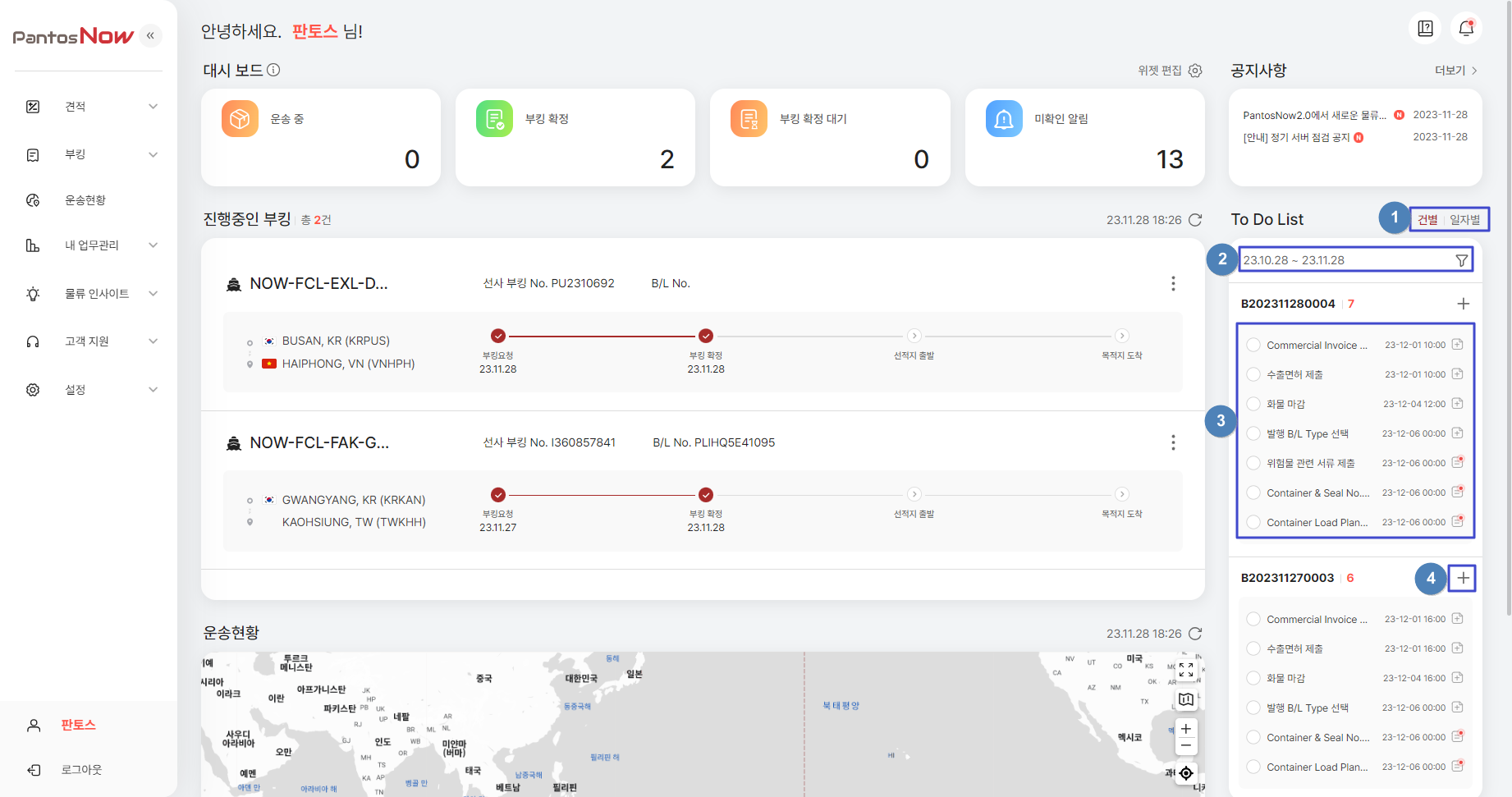
PantosNow provides advance notifications of cut-off times for bookings, both by individual B/L and by deadline date, to help you avoid missing important deadlines. You can also add and manage your personal schedule.
① Task Classification
Tasks are sorted and displayed by booking B/L or deadline date.
② View Settings
Use the Filter icon  to customize the display order, view period, and perform detailed searches by task title. You can also choose to view only incomplete tasks.
③ Task and Memo Management (Addition)
Review tasks related to booking requests. Click on each item to add or modify memos. Tasks with registered memos will be marked with an icon. 
④ Task Management
Mark completed tasks as done for each item (select and save). Completed tasks will be removed from the to-do list.
7. Additional Features
If you have any difficulties using PantosNow, we have prepared feature-specific FAQs in the Quick Guide. You can view notifications from the estimation and booking stages all in one place.
① Quick Guide (FAQ & User Manual)
Click  icon to read quick guide - FAQs and user manual. Click
  to access user manual.
② Notifications ( )
)
You can check all notifications for each process on PantosNow. Notifications can be modified, searched, or filtered by category or arrival date.