Tracking
1. Menu path

① Transportation Status Tab: The transportation status is categorized by segments after the booking is completed.
② Detailed Search: Search directly using relevant keywords such as Booking No or origin/destination.
③ Set View Items & Excel Download
④ Transportation Information:
Transportation Type
Booking No
Status
Origin Port
Destination Port
⑤ ETD/ATD & ETA/ATA:
Estimated Time of Departure / Actual Time of Departure
Estimated Time of Arrival / Actual Time of Arrival
⑥ Consignee
⑦ Notifications: Information on destination issues and delays will be displayed.
⑧ Progress Bar: Shows the current status of the cargo's movement.
⑨ Detailed Transportation Status: Select individual shipments to view detailed transportation status.
2. Tracking
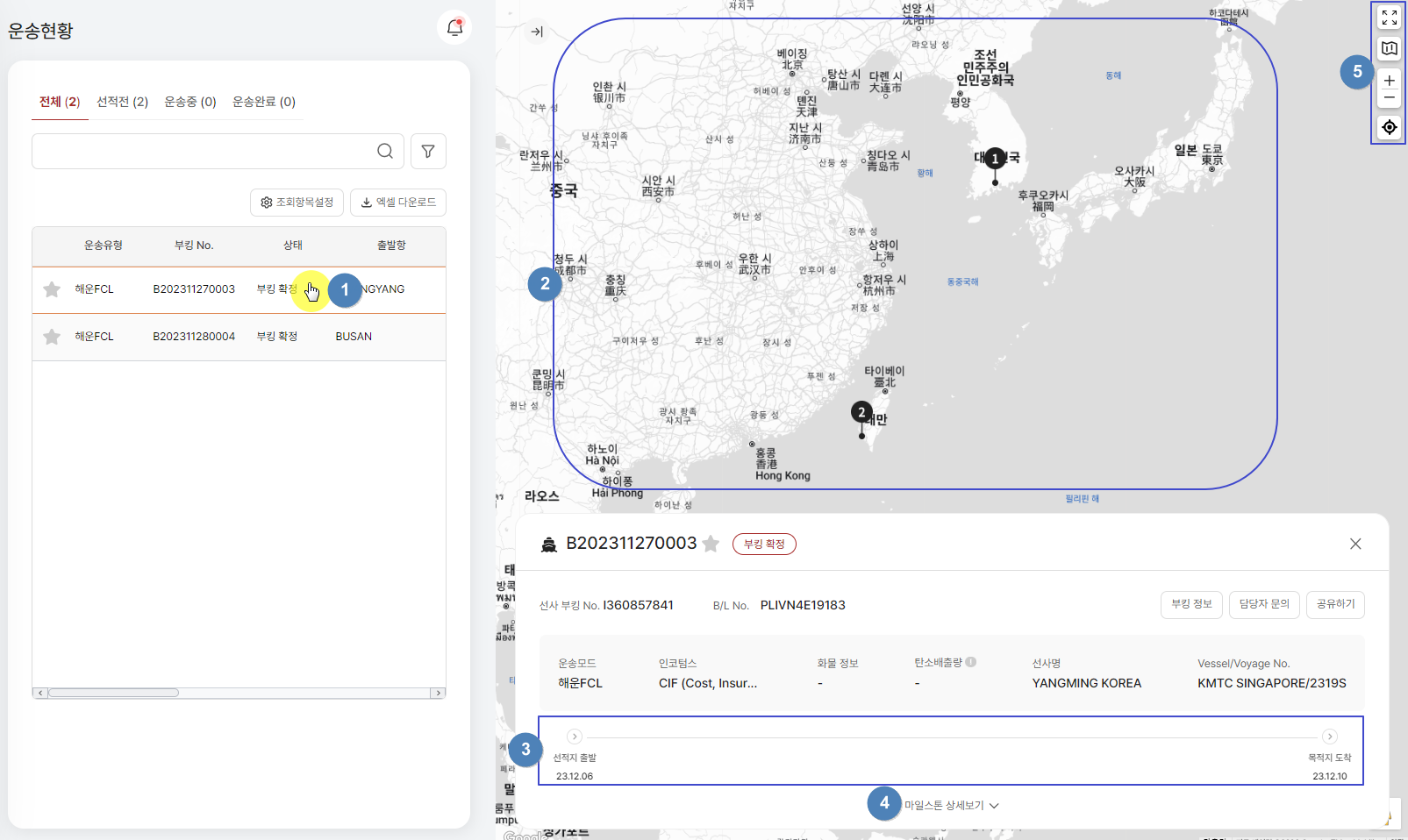
① Select Transportation Order & View Details: When you select a transportation order for detailed viewing, a detailed screen will appear on the right.
② Map View: The origin (1) and destination (2) are displayed on a Google-based map.
③ Current Transportation Status: Check the current transportation status (Milestone) and remaining transportation status.
④ Detailed Milestone View: You can view detailed milestones.
⑤ Map View Options: The map view can be configured with various options, including satellite view and dark mode.
Last updated